Overview
GPIBEE exposes GPIB instruments via the VXI-11 protocol over TCP/IP — whether the connection is USB (USB Network Mode) or standard Ethernet. Any VISA implementation that supports VXI-11 can communicate with GPIBEE, including:
- PyVISA with any backend (pyvisa-py, NI-VISA, R&S VISA, Keysight IO)
- Rohde & Schwarz VISA (R&S VISA)
- NI-VISA (National Instruments)
- Keysight IO Libraries Suite
- Any other VXI-11-capable VISA implementation
Prerequisites
Before starting, make sure:
- GPIBEE is connected via USB-C and powered (orange LED lit — USB Network Mode active). You can also connect it over Ethernet, but for easier reproduction this tutorial uses USB Network Mode, since it has a known, fixed IP address.
- You can reach
192.168.3.2in a browser (the GPIBEE web interface loads) - Python 3.8 or later is installed (python.org)
Install PyVISA
PyVISA is the standard Python library for VISA instrument communication. Install it along with the pure-Python backend pyvisa-py, which requires no additional VISA runtime:
# Install PyVISA
pip install pyvisa
pyvisa-py is only needed when no native VISA runtime is present.
pyvisa-py has known bugs — some fixed in newer releases, some not — and it's not always obvious which version is installed on a given machine. In general it works fine for most use cases, but because of those bugs there are corner cases where it can misbehave — timeout handling and lock handling (e.g. VI_ATTR_EXCLUSIVE_LOCK) are two areas that have tripped people up. If you run into odd behavior, a full VISA runtime such as R&S VISA, NI-VISA, or Keysight VISA is worth trying instead — PyVISA works well with all of them.
Getting the VISA resource name
The easiest way to find which GPIB devices are connected and get the VISA resource name is by using the web interface. Open http://192.168.3.2, navigate to the GPIB dashboard, then click scan. A list of available GPIB devices shows up:
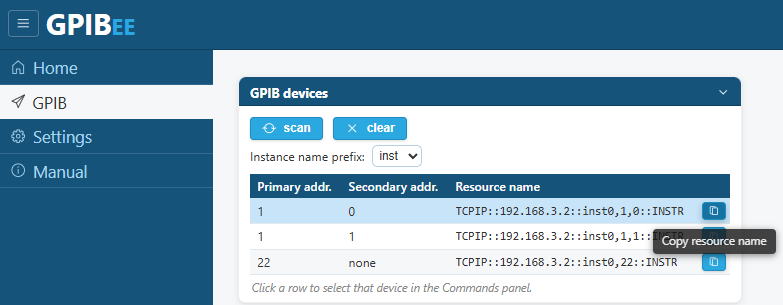
For this example, an HP3457A multimeter is on address 22, and a CMU200 is on address 1,0 (primary 1, secondary 0) as well as address 1,1. We'll start by accessing the CMU200, which is GPIB-wise quite modern — SCPI-compliant, with EOI termination for reads.
A small test program
The program below reads the *IDN? response from the instrument at primary address 1, secondary address 0 (the CMU200):
import pyvisa

# Create resource manager (uses pyvisa-py backend if no native VISA installed)
rm = pyvisa.ResourceManager()

# Open the instrument — CMU200 at GPIB primary address 1, secondary address 0
inst = rm.open_resource('TCPIP::192.168.3.2::inst0,1,0::INSTR')

# Optional: set a timeout (milliseconds)
inst.timeout = 5000

# Query instrument identification
idn = inst.query('*IDN?')
print('Instrument:', idn)

# Always close when done
inst.close()
rm.close()
When running it, it returns:
Instrument: Rohde&Schwarz,CMU 200-1100.0008.02,0,V5.22
You can write text commands by calling inst.write("your command"). You can read data back by calling response = inst.read(). Or make a query by calling response = inst.query("your query command"), as shown in the code above using *IDN?.
Whenever an instrument is opened, e.g. via cmu200 = rm.open_resource('TCPIP::192.168.3.2::inst0,1,0::INSTR'), GPIBEE always checks whether an instrument is actually present at that address (here 1,0). If not, it returns an error.
Setting read termination
As shown in the web interface GPIB scan, there is also an instrument on GPIB address 22 — an HP3457A multimeter. By default this instrument does not have EOI enabled, and it doesn't support the SCPI command set, so an *IDN? query on it would run into a timeout.
To demonstrate this, running the following code against the HP3457A:
import pyvisa

# Create resource manager (uses pyvisa-py backend if no native VISA installed)
rm = pyvisa.ResourceManager()

# Open the instrument — HP3457A at GPIB address 22
inst = rm.open_resource('TCPIP::192.168.3.2::inst0,22::INSTR')

# Query instrument identification
idn = inst.query('*IDN?')
*IDN? isn't understood by this instrument), then after a few seconds raises:
VisaIOError: VI_ERROR_TMO (-1073807339): Timeout expired before operation completed.This happens because the read isn't EOI-terminated, while GPIBEE by default terminates a read when EOI is generated.
The HP3457A manual shows that reads are by default terminated with \r\n. To enable \n read termination:
inst.set_visa_attribute(pyvisa.constants.VI_ATTR_TERMCHAR, ord('\n'))
inst.set_visa_attribute(pyvisa.constants.VI_ATTR_TERMCHAR_EN, True)
The first line sets \n as the read termination character. The second enables character-based read termination.
The HP3457A doesn't support *IDN? — the equivalent for this instrument, as for many older HP measurement instruments, is ID?. So we can now execute:
idn = inst.query("ID?")
print(idn)
...and get the instrument name back, as expected:
'HP3457A\r\n'
\r\n is not stripped away by GPIBEE — this is expected and intentional, since it's a fully transparent channel. Reads can also terminate on either the set character (\n) or when EOI is generated; if termination characters were stripped automatically, there would be no way to tell those two cases apart.
PyVISA has the ability to strip read termination automatically instead. This can be done by calling:
inst.read_termination = "\r\n"
When now executing the same query again, we get 'HP3457A' as the response — without the \r\n characters.
Here's the full example script:
import pyvisa

# Create resource manager (uses pyvisa-py backend if no native VISA installed)
rm = pyvisa.ResourceManager()

# Open the instrument — HP3457A at GPIB address 22
inst = rm.open_resource('TCPIP::192.168.3.2::inst0,22::INSTR')

inst.set_visa_attribute(pyvisa.constants.VI_ATTR_TERMCHAR, ord('\n'))
inst.set_visa_attribute(pyvisa.constants.VI_ATTR_TERMCHAR_EN, True)
inst.read_termination = '\r\n'

# Query instrument identification
idn = inst.query('ID?')
print('Instrument:', idn)

# Always close when done
inst.close()
rm.close()
PyVISA timeout handling
Some instruments can take a longer time to return a response — this can happen, for example, for large data transfers. There are more sophisticated approaches using service requests, where an instrument signals its readiness via an interrupt, but sometimes it's easier to just increase the timeout.
The timeout property returns the current timeout, in milliseconds:
print(inst.timeout)
2000
2000 means 2000 ms, which is 2 s — this is the default timeout value. You can change it by assigning another number to it. To increase the timeout to 5 s, execute:
inst.timeout = 5000
Controlling multiple GPIB instruments with one GPIBee
There are no special considerations to be made by the user. You can simply open two — or more than two — instruments with different GPIB addresses and talk to those independently. This even works when GPIBEE is controlled from several PCs at the same time.
Settings specific to an instrument stay specific to that instrument. In the example below, we have the CMU200 with EOI read termination and the HP3457A with \n termination used at the same time. GPIBEE also consistently takes care of proper synchronization on the GPIB bus, even in much more sophisticated cases.
Example code, controlling both instruments:
import pyvisa

# Create resource manager (uses pyvisa-py backend if no native VISA installed)
rm = pyvisa.ResourceManager()

# Open CMU200 on GPIB address 1,0
cmu200 = rm.open_resource('TCPIP::192.168.3.2::inst0,1,0::INSTR')
cmu200.read_termination = '\n'

# Open HP3457A on GPIB address 22
hp3457a = rm.open_resource('TCPIP::192.168.3.2::inst0,22::INSTR')
hp3457a.set_visa_attribute(pyvisa.constants.VI_ATTR_TERMCHAR, ord('\n'))
hp3457a.set_visa_attribute(pyvisa.constants.VI_ATTR_TERMCHAR_EN, True)
hp3457a.read_termination = '\r\n'

# Query instrument identification
print('CMU200 *IDN? query response: ', cmu200.query('*IDN?'))
print('HP3457A ID? query response: ', hp3457a.query('ID?'))
print('CMU200 *IDN? query response: ', cmu200.query('*IDN?'))
print('HP3457A ID? query response: ', hp3457a.query('ID?'))

# cleanup
cmu200.close()
hp3457a.close()
rm.close()
Prints when running this code:
CMU200 *IDN? query response:  Rohde&Schwarz,CMU 200-1100.0008.02,0,V5.22
HP3457A ID? query response:  HP3457A
CMU200 *IDN? query response:  Rohde&Schwarz,CMU 200-1100.0008.02,0,V5.22
HP3457A ID? query response:  HP3457A
More advanced features
Troubleshooting
| Problem | Solution |
|---|---|
No resources found with list_resources() |
Make sure the GPIBEE web interface is reachable at 192.168.3.2 first. Use the GPIB scan there to confirm the instrument shows up, then copy its resource name directly. |
VisaIOError: VI_ERROR_TMO on *IDN? |
The instrument likely doesn't support SCPI / *IDN?, or doesn't EOI-terminate its reads. See Setting read termination above. |
| Wrong GPIB address — no response | Re-run the scan in the web interface to confirm the instrument's primary (and secondary, if any) address, and update the resource string accordingly. |
Garbled responses, or extra \r\n in the returned string |
Set inst.read_termination explicitly instead of relying on defaults — see the HP3457A example above. |
| Settings on one instrument seem to affect another | Termination and timeout settings are per-resource, not global — set them individually on each inst/rm.open_resource(...) object. |
192.168.3.2 — the GPIB scan there can help you verify the instrument is responding before blaming the VISA layer.